Monday, April 13, 2015

["Hip","Hip"] Array

ARRAY

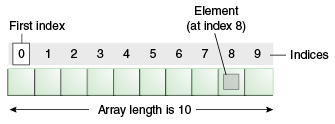
An array is a container object that holds a fixed number of values of a single type. The length of an array is established when the array is created. After creation, its length is fixed. Many people have seen examples of an array already but dont really notice it. We have seen in already in the main method  of the "Hello World!" application. 
Illustration of an array as 10 boxes numbered 0 through 9; an index of 0 indicates the first element in the array
Each item in an array is called an element, and each element is accessed by its numerical index. As shown in the preceding illustration, numbering begins with 0. The 9th element, for example would therefore be accessed at index 8. 

What I learned?
  What I learned while doing this unit basically was how to use an array and what an array is. Coming into this unit I had no clue how to use it but now I have some sort of idea how to use it in a piece of code. What an array is useful is, is that by using arrays to can easily make lists of variables using only one command. Arrays I learned are also useful because instead of making a long list of If, Else statements you can just use arrays and save lots of time in writing your codeSo how exactly do you reference variables in an array?
In Java all values, or data stored in an array is assigned a number value starting with 0. If i were to print x[0] from above the output would be "a". If i were to print x[1] the output would be "b".


Tuesday, March 10, 2015

HeadFirst Java Chapter 6

In Chapter 6, the Java API is introduced, the Java API is a library of already written code for generic tasks. What I had to do in this chapter is to pull the ArrayList class from the java API. What the ArrayList is, is an object that one can use methods on, which cannot be done with regular arrays. In fact, ArrayList objects are more powerful and flexible than regular arrays, the only case where a regular Array might be more useful is in a list of primitive values. Since ArrayLists are objects, the use regular Java language, unlike regular arrays that have specialized components. There is also a way to restrict the type of things that are allowed into the ArrayList. ArrayLists do not need an assigned size, things can be added to them and removed and the size will grow and shrink whenever needed. Regular Arrays do not do that, if one exceeds the size of the array, a runtime error pops up.

Within boolean expressions, I leanred new concpets that can be applied, like the 'and' and 'or' operators. within a boolean expression next to an if statement, while loop, etc. && can be used inbetween two statements to say "Hey if both of these are true, do this" or "while bnoth of these are true, do this". || works similarly, except EITHER statement can be true for the whole expression to be considered true. Also, x != 1 means x does not equal 1, and that little thing can be put wherever an expression needs to be true when something does not equal something else. But what about if the code requires the .equals() operator rather than an =? well then a ! gets plopped in front of the entire thing and it means not equal.

In order to use any class from the Java API, one can just use it as if it were their own class he or she made and compiled. The only exception is the FULL package must be imported to the package bein written. For example, to use an ArrayList, one can type "import Java.util.*". "import" is the import function, "Java" is the language, "util" is the package, and "*" is where the class goes, however using the * imports all classes within the package. any code that is imported that begins with "Javax" rather than "Java" originally began as an extension, but then began to  be included in the Java API. other than that, there is no difference.

HeadFirst Java Chapter 5

When I read this chapter I found it to be extremely useful and full of useful information. This chapter was mostly about bigger, stronger methods, and the beginnings of creating a good old game of battleship. This chapter mostly focused on creating a very simple 2D grid version with three ships. But instead of doing that I made one row board with one ship that will be expanded into the full game in Chapter 6.

One really key method to writing code it to first write a prep-code, then you should test the code, then do the real code. The prep-code is just what you want to happen and not how to do it, then test code is where you start to test certain parts of the code without implementing methods, then the real code is the full blown code where everything will work.

A few new things were explained in this chapter. The Integer.parseInt() method was explained. the "Integer" is a class that ships with Java. "parseInt()" converts whatever is in the parenthesis into an integer if, and only if, it is a digit. For example, a string "3"  would be changed into an integer 3. For loops were explained. They are formatted like so; for (variable : array). They mean for every variable in the array repeat. The post-increment operator, or ++ after a variable, was explained and it just adds 1 to whatever variable it is in front of. There is also a post-decrement operator which is a variable with -- after it. it subtracts 1 rather than adds 1. "Pre" versions of both exist and mean add or subtract 1 then use the new value of the variable, if they are in an expression of some kind. Break statements were explained. They just immediately end loops by saying "break". How to make a random number was explained. "int randomNum" declares an integer that is called randomNum. Then "= (int) (Math.random() * 5) follows it. The "(int)" forces the random number to be an integer. "Math" is a class that comes with Java, and "random()" is a method within that class. it generates a random number from zero to just less than 1 (so 0.999999...). The "* 5" increases the range of the random number from anywhere between 0 and just below 5 (or 4.9999999...). Since the variable must be an integer, any of those decimal nines will be cut off, leaving a number between 0 and 4. How to get user input was also explained. "String guess = helper.getUserInput("enter a number");" is how to do so. "String guess" declares the string variable guess. "helper" is an instance of a class made to help specifically with the battleship game. "getUserInput" is a method of the "helper" class that takes what the user has typed when the user pressed return, and gives it back as a string. "("enter a number")" is what is going to be displayed right before the method starts looking for user input. There is also another kind of for loop. "for(int i = 0; i < 100; i++) {}". "int i = 0" declares a new integer variable. "i < 100" is the boolean test. this specific for loop will run 100 times. "i++" adds 1 to "i" every time the loop is run. When the amount of times a loop is wanted to run, a for loop should be used rather than a while loop.


This is the JVM section of the textbook. It was easy to complete because all that was needed was to run through the program and add variables, the writing on the page explains what I did to figure out the output.


Game.class This is the main class


GameHelper.class


Simpledotcom.class


This is the result when a game is played. The player won without missing.

Friday, March 6, 2015

Age Verifier


What these pieces of codes do is call the current day,month,year and uses the JOptionPane to collect the information from the user. Then it converts the month value to a string to present your birthdate, and compares the date of the current date to your provided birth date by checking a few of the following things:


  • If (currentYear - year <= 17) you are younger than 18 and cannot gain access to the website.
  • If (year  >= 17) and (month <= currentMonth) and (day <= currentDay), you are above 18 and can gain access to the website
  • But if (year >= 17) and (month <= currentMonth) and (day > currentDay), you are younger than 18 and cannot gain access to the website.

 The current date is callled by using the Date and DateFormat utilities, then each integer is parsed using a delimiter, "l". These integers are then made into the values of currentYear, currentMonth and currentDay, which are compared to the user input values, year,month, and day. Excepting a tiny portion of the population that was born in the 12 hours between the current day and the next day, anyone younger than 18 cannot convert the boolean value "access" to "true", unless they lie.

Monday, February 23, 2015

HeadFirst Java Chapter 4

As described in previous chapters, a class is a blueprint for an object. All objects within a class will have the same methods, however, they may behave differently depending on instance variables. Arguments are passed on to methods as parameters.  Arguments are generated within a method, and sent somewhere. Parameters are arguments from one method that were sent to another method. values can be returned from methods using the return command. When a method is declared to return a value, the method must be declared using the same, or a compatible variable type as the returned value. methods can have multiple parameters, but they will be arranged in the order they were sent in as arguments, regardless of what the parameters are named.

Getters and setters, or accessors and mutators, set and retrieve data. For example, a setter method will set a variable, then the getter method is called to retrieve the value that was originally set. However we have a problem because all of our data thus far has been exposed, meaning any reference variable can change anything with a dot operator. This can be prevented by making all instance variables start with "private" and all getter and setter methods "public" so they can be accesses anywhere.

Even if Instance variables are not assigned values, they have a default value. integers is 0, floats are 0.0, booleans are false, and references are null. Instance variables are declared within a class but not within a methoid and local variables are declared within a method. Local variables, unlike Instance variables, need a value assigned to them before use. They do not have a default value. to see if any primitive variables are equal, one can use the == operator. The same goes to see if two reference variables refer to the same object. However the == operator cannot be used when seeing if two objects are the same. for that one must use the equals() method.

Friday, January 30, 2015

Unique Java Program


In this unique piece of code, the code picks a random integer between 1 and 100 and sets it to the numberToGuess. Our code also  assigns three other variables, win, guess and numberOfTries. Every time you make a guess, the integer you select is set to the guess value, then it is checked of it is equal to the numberToGuess. If it is not the numberToGuess, then win remains false and two new methods are run. The first method checks if the guess is greater than the numberToGuess. If true, then it will tell you that your guess is too high. Else, if the guess is less than the numberToGuess the code will tell you your guess is too low. Every time a guess is made, one is added to the numberOfTries. When the guess is equal to the randomly assigned numberToGuess, the boolean value win is set to true and the build ends after telling you the numberToGuess and the numberOfTries.


Tuesday, January 27, 2015

HeadFirst Java Chapter 3

Chapter 3 was all about variables and all the uses they have and how to utilize them to the fullest extent. There are two types of variables, primitive and reference. primitive variables are variables such as boolean, integer, or float variables that hold bits representing a value. Reference variables reference an object and use it in a method  by utilizing the dot operator.If a reference variable has no object to reference, it will return "null". I was able to complete the "dog" code.'


This is the "dog" code, however there is an error. This can be seeen becuase of the "null" in the output. a reference variable is not referencing an object. I fixed it by moving "dog1.name = "Bart";" above "dog1.bark();" because when the method "dog1.bark();" was ran, there was no name associated with dog1 so then dog1 was supposed to bark, it returned "null says Ruff!" instead of "Bart says Ruff!"


Here is the corrected version of the code.
I was also able to complete the "Be the Compiler" section of this chapter pretty easily.


With A, "myBooks[0]","myBooks[1]", and "myBooks[2]" were not declared as the object "new Books();". threee lines of code, one fore each "myBooks" needed to be included to make the array of "myBooks" into objects. B was simple. Arrays begin at zero so z should equal -1 to begin rather than 0, and the while loops should continue until z is greater than or equal to 3. The 2 in the image should be a 3.


HeadFirst Java Chapter 2


Chapter two is all about objects and classes and how they relate and interact. I found this to be a very helpful refresher on how java works and used OOP (Object Oriented Programming). I am beginning to learn how to read and write java. Because classes are like a blueprint of how an object will function, it is not hard to make one class and several objects. This allows for adding more things to a program without changing previously edited code. Objects have their own variables and methods that are either global variables and methods, inherited variables and methods from its class, or local variables and methods. A super class can be created so many classes can inherit traits from the larger class. I was able to complete the "Be the Compiler" page in Chapter 2 with relative ease.


The errors were relatively easy to spot. In the "A" section, the "t" variable was never defined. It would appear that the programmer would have wanted to declare "t" as a "new TapeDeck". To do this, they would have had to type TapeDeck t = new TapeDeck();" in the "TapeDeckTestDrive" class.

The error in the "B" section was also simple. The "playDVD" function that was called in the "DVDPlayerTestDrive" class was not defined. In order to do this the programmer would need to type "void playDVD() { //some code to run }" in the "DVDPlayer" class. this way the code in the "DVDPlayerTestDrive" class would call the "playDVD" fuction of the "new DVDPlayer" as defined by "d" from the "DVDPlayer" class.


Tuesday, January 13, 2015

HeadFirst Java - Chapter 1


        Chapter 1 of this book call Headfirst Java was very intriguing, reading this book was much better than any other book or textbook that i have read in school. However, it was only chapter 1 and it was kinda just an introduction to Java and since I already have a small background in Java I really did not learn much as it was more of refresher. But on the other hand I was able to troubleshoot the 99 bottles of beer song program and troubleshoot the random phrase generator and make them both successfully run. The code for both are posted below.


99 Bottles of beer program

     The error in this program was that there was a line say " 1 bottles of beer on the wall" and that is very improper grammar. So all I did to fix it was instead of having beerNum > 1, I made it > 0 and it ended up solving the grammatical error. So again this served as a refresher for me for my Java skills, but since then I have learned Python. Python syntax is like Java in many ways but is less complex. I have found that I am almost writing Python syntax when writing the code above. I have high hopes for this Java book to teach me more about Java and take me more in depth about it.


Random Phrase Generator


This is the code for my random phrase generator. I did this for some extra work and to see what I could do and how much I could remember and do on my own. It actually ran on my first time and did what I wanted to do. Unlike when I did Python I would have to go through each time and fix my code several times before it would run. I was able to generate random phrase from my words list just like I wanted to do. When finishing a good piece of code and then seeing it actually work it gives you a since of accomplishment and just makes you feel good about yourself. All in all chapter 1 for Headfirst Java was very successful in refreshing my memory and getting me back on track to learn more Java.